See every sequence together
The step grids line up down the screen. You can see the kick, hats, bass and other parts against the same beat without opening separate editors.
A macOS groovebox for building and playing electronic music ideas.
Why I built it: I wanted to bring all the key things from my DAWs different screens up to one surface so you could jam everything out live without changing screens or menus to find parameters. Also key was to see all sequences on one screen showing how parts interacted. The idea being to keep me focussed on the notes, beats and worry about production later in the DAW — AJW
Free while in beta
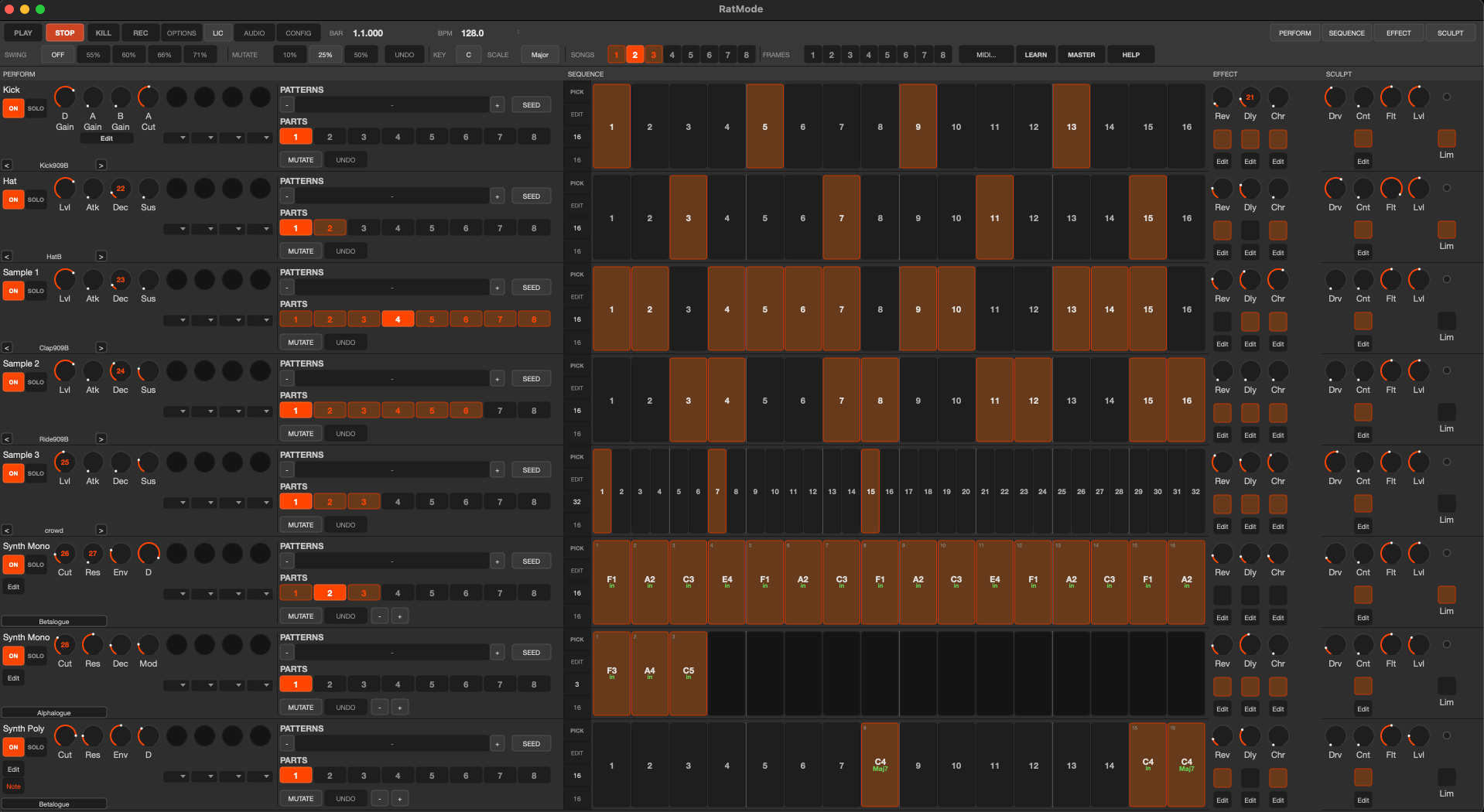
Each row is one instrument pipe. The rows stay in the same place as you move between Perform, Sequence, Effect and Sculpt, so you can keep seeing how the parts fit together.
What is different
The point is to provide enough production to allow the idea to come through but to keep the focus on the musicians work on the sequence, notes, groove, and less on screen changes and fiddling around. That comes later if you choose to move to DAW.
The step grids line up down the screen. You can see the kick, hats, bass and other parts against the same beat without opening separate editors.
Switch patterns, mute pipes without cutting off their tails, and save the complete arrangement as a Frame that you can recall while the music runs.
Seeds gives you basic unfinished random musical starting sequences, whereas Mutate creates minor evolutions of the sequence by adding notes (you can set the degree of mutation in % terms)
One pipe
A pipe is RatMode's name for one instrument row, track, channel. Four different sections bring up to the surface the different things that are buried in screens in your DAW so you can easily access them all on one screen.

Choose the instrument, switch it on or solo it, use eight live controls and move between its eight parts. Change the sequence with a new Seed idea or Mutate whats there with randomisation.
Write the hits or notes and adjust velocity, timing and length. Every pipe uses the same horizontal timeline a bit like a 909 or Elektron, but easier on the bank balance!
Reverb, delay and chorus sends add depth, movement and width without setting up a separate effect chain.
Drive, contour, DJ filtering and limiting shape the sound. Contour can draw or choose a one-beat / one-bar ducking shape without sidechain routing.
In the current beta
RatMode works without extra plug-ins, but it is not a closed system.
Kick, sample, monophonic synth and polyphonic synth.
Add WAV, AIFF and FLAC files to the RatMode Samples folder.
Supported synth pipes can host Audio Units installed on your Mac.
Use MIDI Learn for knobs and map hardware pads to mute and solo.
Keep separate ideas and recall pattern-and-mute arrangements.
Export the individual pipes for arrangement and production in a DAW.
Current state
I use it myself, but it is still being developed. Back up important work, expect rough edges and tell me when something gets in your way.
Please treat it as a beta
The current build has been tested on the more recent macOS version and on older Sequoia versions. It may behave differently with other versions, audio devices or Audio Unit instruments.
A note from me
I kept losing ideas to setup, routing, changing screens and polishing EQ. I wanted the beginning of the process to feel more like playing, with the sounds and sequences in front of me.
I am a solo independent builder. I use RatMode, notice where it slows me down, change it and try again. Your feedback has already led to many improvements including clearer controls, shift-click octave changes and a surprisingly useful way to halve a sequence while choosing which half survives.
— AJW
Try it
It is free to test. If you use it, I would like to hear what helped, what got in the way and what you expected to find but could not.
/ / / RATMODE BETA — DROP 0.1
Tested on macOS Sequoia 15.7.3 only. Older versions may run but are unsupported during beta — if you try it on Sonoma or earlier, tell us how it goes at hello@divurj.com.